What changed? The first hour after an incident or outage

A free one-page checklist for security and IT teams working on Windows machines.

  • Stabilise without destroying the evidence you need
  • Preserve logs and the state of the machine
  • The places on a Windows machine to check for what changed
  • Decide what happens next, and who needs to know

Get the free checklist

We'll email you the one-page PDF.

We'll use your details to send the checklist and, occasionally, related updates from Tracknosis. You can opt out at any time. See our Privacy Policy.

Check your inbox

Your checklist is on its way. If it hasn't arrived in a few minutes, check your spam folder.

What's in the checklist

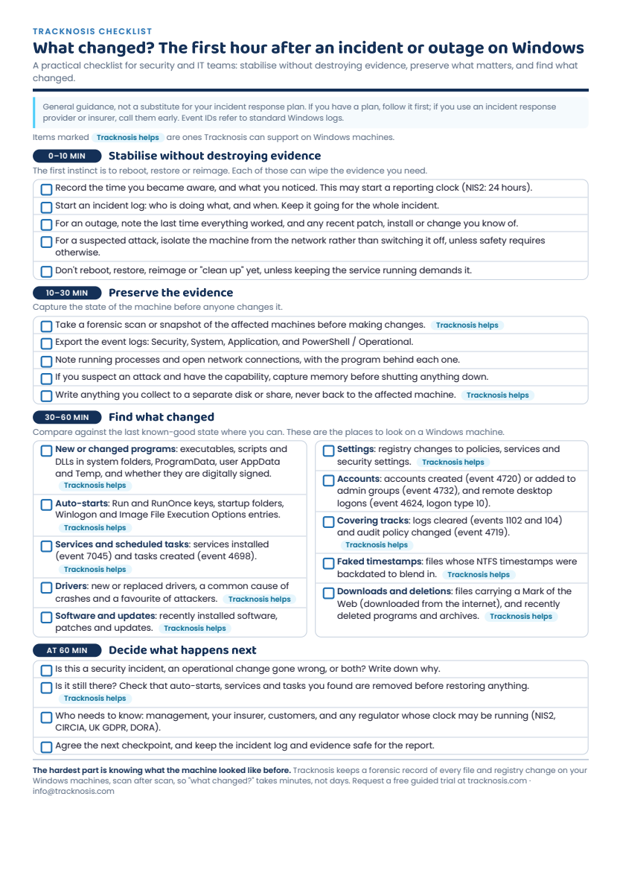
Four stages, one page

Whether it's an attack or an update that broke something, the first hour decides whether you find the cause quickly or lose the evidence.

0–10 minStabilise without destroying evidence

Record when you became aware, start an incident log, isolate a suspected compromised machine rather than switching it off, and hold off rebooting or reimaging until the evidence is safe.

10–30 minPreserve the evidence

Scan or snapshot the affected machines, export the Security, System, Application and PowerShell logs, note running processes and connections, and write everything to a separate disk.

30–60 minFind what changed

Check new or changed programs and DLLs, auto-starts, services and scheduled tasks, drivers, software and updates, settings, accounts and remote logons, cleared logs, faked timestamps, downloads and deleted files.

At 60 minDecide what happens next

Security incident or operational change? Is it still there? Who needs to know, including any regulator whose reporting clock may be running?
Get the free checklist

Preview of the one-page checklist: what changed? The first hour after an incident or outage on Windows
The hard part

Knowing what the machine looked like before

Finding what changed is quickest when you have a record from before it happened. Tracknosis keeps that record, reading every file and registry change directly from the disk, scan after scan, so "what changed?" takes minutes, not days.

Request a guided trial   See the use cases