What timestomping is
Timestomping means changing a file's timestamps to hide when it really arrived. Investigators often start by sorting files by date around the time of an incident; a file backdated by a few years simply drops out of that view. It is a common technique, recorded in the MITRE ATT&CK framework as "Timestomp" (T1070.006).
It is also easy to do. Windows lets any program set a file's created, modified and accessed times through a standard API, and many attacker tools, and even a single PowerShell command, can do it.
Why it can be detected: NTFS keeps two sets of timestamps
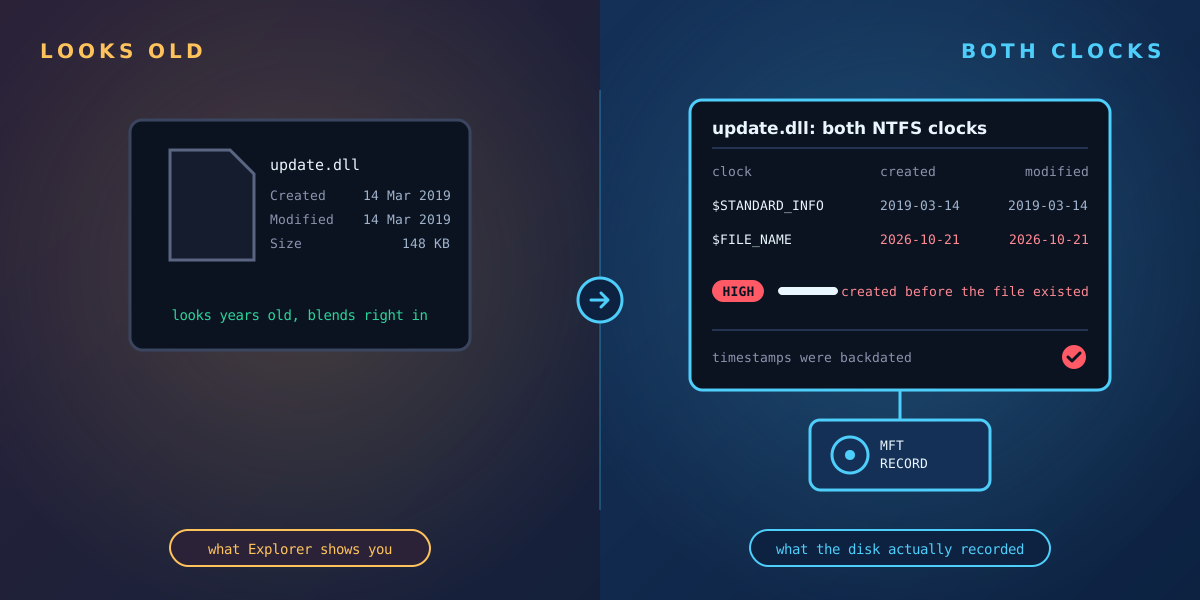
On an NTFS volume, every file's record in the master file table holds two separate sets of timestamps, each with four values: created, modified, record changed and accessed.
| Timestamp set | What uses it | Who can change it |
|---|---|---|
$STANDARD_INFORMATION | What Explorer, dir, PowerShell and most tools show you | Any program, through the standard Windows API |
$FILE_NAME | Kept with the file's name; not shown by normal tools | Set by Windows itself when the file is created, renamed or moved |
A typical timestomping tool changes only the first set. The second set still records when the file really arrived. Comparing the two is the classic way to catch it.
Signs to look for
- Created earlier in $STANDARD_INFORMATION than in $FILE_NAME. A file can't have been created before Windows recorded its name. This is the strongest single sign.
- Suspiciously round timestamps. NTFS records time to a fraction of a second. Tools that set times by hand often leave the fractional part at exactly zero, which is rare for files created normally.
- A file "older" than its surroundings. For example a system DLL dated before the operating system was installed, or before the folder it sits in was created.
- Old dates on files in unusual places. A "2019" executable in a user's Temp or ProgramData folder deserves a closer look.
- Timestamps that move backwards. If you have an earlier record of the machine, a file whose dates got older between two checks has been changed.
Legitimate causes that look similar
Not every mismatch is an attack. Expect some of these on a normal machine:
- Copied and extracted files. Copying a file or extracting it from an archive often keeps the original modified time, so a "modified" date older than the "created" date is normal on its own.
- Backup restores and copy tools that preserve timestamps, which can carry an old creation date onto a newly written file.
- Some installers deliberately set files to their build date.
That is why context matters: an old creation date on a signed Microsoft file restored from backup means little; the same pattern on an unsigned executable that a new service points to means a lot.
How to check
Windows' own tools only show the $STANDARD_INFORMATION times, so they can't reveal timestomping by themselves. You need something that reads the master file table directly. Forensic analysts commonly use free tools such as Eric Zimmerman's MFTECmd, which parses the master file table and flags records where the two sets disagree or have zeroed fractions. That works well for a one-off investigation on a collected copy of the file table.
Bear in mind that a skilled attacker can make the two sets agree, for example by moving a file after changing its times. So treat a clean result as "no obvious sign", not "proof of innocence", and look at the other evidence too: the change journal, event logs, and how the file is launched.
Where Tracknosis fits
Tracknosis is a lightweight agent for Windows that reads every file record directly from the master file table on every scan, so timestomping checks happen automatically, across the whole disk, without collecting anything by hand:
- Timestamps moved backwards since the last scan. The most reliable sign: a file's created or modified time is now earlier than at the previous scan. Tracknosis flags it as possible timestomping, High on a program or script and Medium on other files, and lists it under Tampering in Intrusion Detection. Exclusion rules can never hide it.
- Both NTFS timestamp sets compared for every file. Anomalies are recorded on every scan: created before the file's name was recorded, suspiciously round times, and zeroed or invalid times. Because many legitimate files show the first two patterns, Tracknosis raises the alarm on the stronger cases: zeroed or invalid timestamps (High), and the timestomp-tool pattern on a program (at least Medium, with "possible timestomp" in the reason).
- Content changed but timestamps didn't. When a program's content changes while its timestamps stay the same, the signature check flags it as High.
- Context with every finding: whether the file is digitally signed, whether it was downloaded from the internet, and whether something is set to start it automatically.
- The other half of covering tracks: cleared or deleted event logs and switched-off auditing are flagged too.
The backwards-timestamp check needs a previous scan to compare against, which is one more reason to take a baseline before you need it.
Catch backdated files automatically
Request a guided trial: we install Tracknosis with you on one of your Windows machines and walk you through your first results.
Request a guided trial More: attacks without signatures