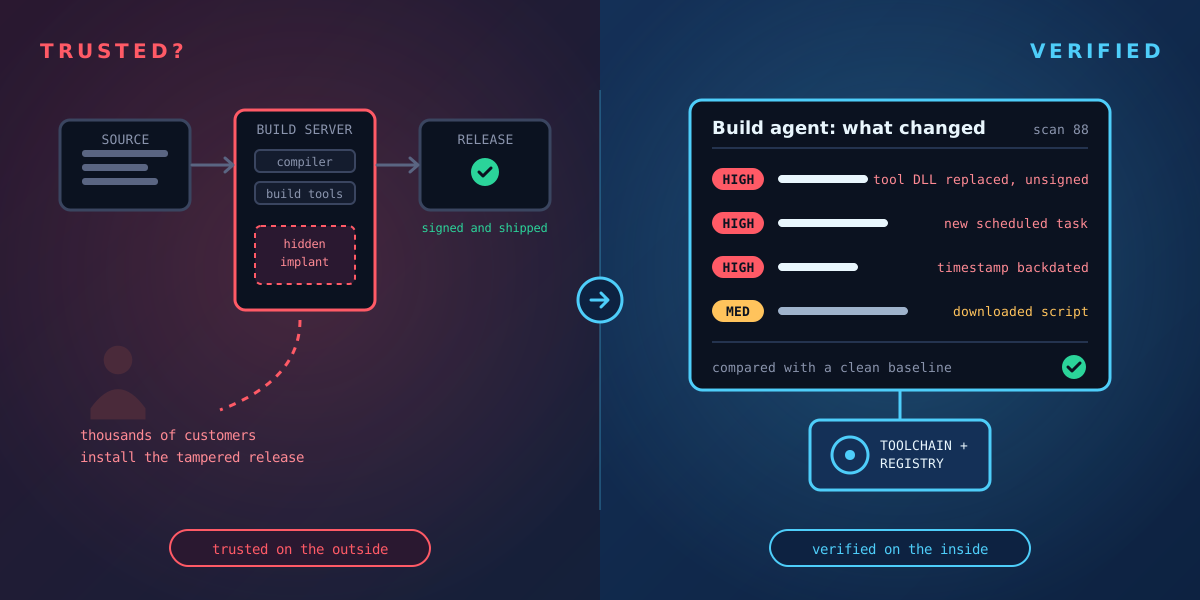
Most organisations protect their source code carefully: access controls, code review, signed commits. Far fewer look closely at the machine that turns that source code into the product. Yet the build server is where trust is created. Its output is signed with your certificate and installed by your customers without a second thought.
If an attacker controls the build server, they don't need to touch your source code at all. They only need to change what happens during the build.
How build servers get compromised
The best-known example is the SolarWinds attack, disclosed in December 2020. Investigators found that the attackers had placed malware on the build environment that watched for the product being compiled and quietly swapped in a malicious source file during the build, then put the original back. The source code in the repository looked clean. The signed release that reached customers was not.
In 2023, the 3CX desktop app was trojanised in a similar way: the attackers reached the company's build environment and shipped a tampered, signed release to its customers. The entry point was traced back to compromised software on an employee's machine, a reminder that the path to a build server is often indirect.
The pattern is the same each time. The attacker changes something on the build machine: a tool, a library, a script, a scheduled task. Then they wait for the next release.
Why it goes unnoticed
- Build servers change constantly. Every build writes thousands of files, so one more changed file looks like noise.
- Nobody logs in to them. They run unattended, so nobody notices odd behaviour.
- Security tools are often relaxed on them. Antivirus exclusions for build folders are common, to keep builds fast.
- The output is trusted by design. If it's signed with your certificate, everything downstream accepts it.
What to check on a Windows build agent
The question to answer is simple: has anything changed on this machine that the build process didn't put there? In practice, look at:
- The toolchain: compilers, build tools, SDKs and their DLLs. These should only change when you deliberately update them, and their digital signatures should be valid.
- Auto-starts and scheduled tasks: new services, Run keys or scheduled tasks are how an implant stays in place between builds.
- Faked timestamps: a tool file whose timestamps were backdated to look old is a strong sign of deliberate hiding.
- Downloaded files: scripts or executables carrying a Mark of the Web, showing they came from the internet.
- Cleared logs and switched-off auditing: attackers often cover their tracks before and after making changes.
Why a clean baseline matters
You can only spot an unexpected change if you know what the machine looked like before. The best time to record a build agent is straight after it is built or rebuilt, when you know it is clean. Every later scan can then be compared with that baseline, and with the scan before it.
That turns "is our build server compromised?" from a question nobody can answer into a list of specific changes, each with a time and a location.
Where Tracknosis fits
Tracknosis is a lightweight agent for Windows that reads every file and registry record directly from the disk and compares each scan with the last. On a build agent, that means:
- Every changed tool, library and script is listed, with its digital signature status, and rated High, Medium or Low with a plain-language reason.
- New auto-starts, services and scheduled tasks are flagged and linked to the files they launch.
- Backdated timestamps, cleared event logs and switched-off auditing show up as findings.
- Because it reads the disk itself, it still sees the change if logs were wiped or a security tool was told to ignore the build folders.
Your own build output will appear as change, which is expected: scan between builds, focus on the toolchain and the system, and use rules to hide routine log and temporary files. Unsigned executables and scripts are never hidden by folder rules, by design, and High-risk changes are never hidden at all, so a tampered tool can't be tidied away by a broad rule.
A simple routine
- Scan each Windows build agent straight after it is built or rebuilt: that is your clean baseline.
- Scan again on a schedule, between builds, and before every release.
- Review any High-risk change to the toolchain, auto-starts or system before the release is signed.
- Keep the scan history: if something is ever questioned, you can show exactly what the build server looked like when each release was made.
Source code gets reviewed. The machine that builds it should be checked too.
Check what changed on your build servers
Request a guided trial: we install Tracknosis with you on one of your Windows machines and walk you through your first results.
Request a guided trial See the use case