Security teams have never collected more data. Splunk, Datadog and Elastic ingest millions of events a day, and they are very good at it. Yet after an incident the same questions keep coming back unanswered: what exactly did the attacker change, and is it still there?
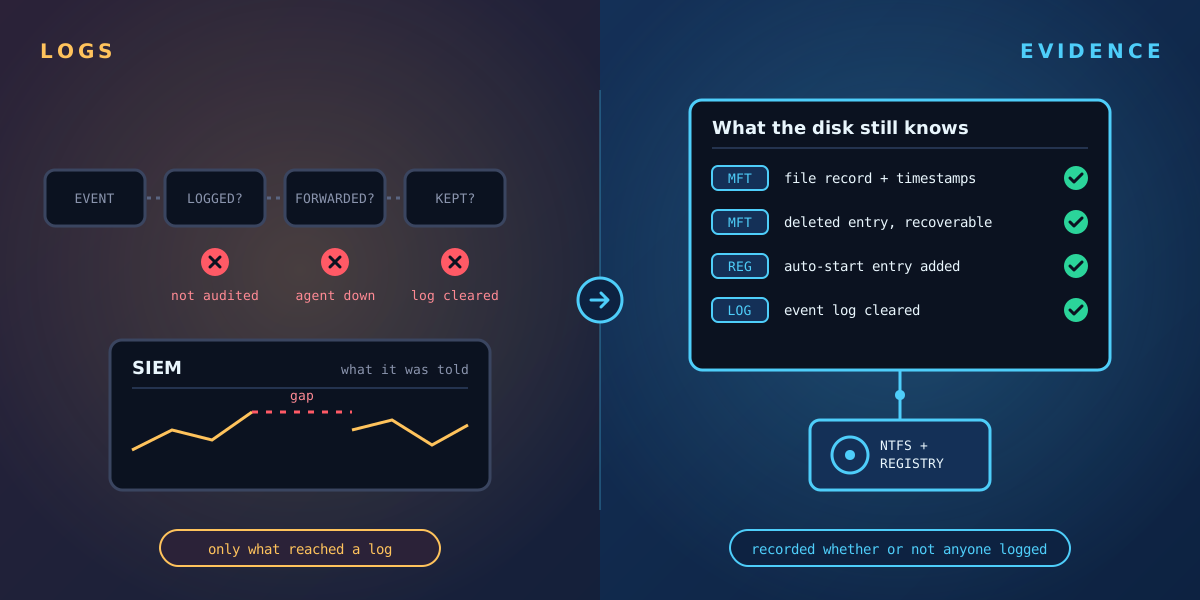
The reason is simple. A SIEM can only analyse what reaches it. That depends on three things going right before the attack starts.
1. The event has to be logged
Windows does not log everything by default. File access auditing, for example, is off unless someone turns it on for specific folders, because logging every file read would flood the system. So a file quietly replaced in C:\Windows\System32, or a script dropped into a user's AppData folder, may never produce an event at all.
2. The log has to be forwarded
Most organisations forward a subset of logs from a subset of machines, because volume costs money. Servers often get full coverage; laptops, test machines and older systems often don't. Attackers know this and go where the coverage is thinnest.
3. The log has to survive
Clearing the Windows event logs takes one command and administrator rights, which an attacker usually has by the time it matters. If the logs were cleared before they were forwarded, the SIEM never sees them.
What the disk still knows
Whatever happens to the logs, the file system and registry carry their own record. NTFS keeps an entry for every file in its master file table, with timestamps, size and location. The registry holds every auto-start entry, service and installed program. When something changes, that record changes too, whether or not anyone was logging.
That is the evidence Tracknosis reads. It scans each Windows volume directly, compares the result with earlier scans, and shows every file and registry key that was added, edited or deleted, rated High, Medium or Low with a plain-language reason. It also flags cleared logs and switched-off auditing, so a gap in your SIEM becomes a finding rather than a blind spot.
Better together
This isn't a case against your SIEM. Logs tell you about activity: logons, network connections, alerts. Change evidence tells you about outcomes: what is actually different on the machine. Sending Tracknosis findings into Splunk puts both side by side, so an analyst can move from "something happened" to "this is what changed" in one place.
See what changed on your Windows machines
Tracknosis gives you proactive forensic monitoring and continuous forensic observability for Windows Infrastructure.
Contact Us More articles