What file integrity monitoring does
File integrity monitoring (FIM) records the state of important files, usually a cryptographic hash plus attributes such as size, permissions and timestamps, and alerts when that state changes. The idea is simple: if a system file, configuration file or application binary changes unexpectedly, someone should know.
For many organisations it is also a requirement. PCI DSS, for example, requires a change-detection mechanism, and names file integrity monitoring as an example, to alert staff to unauthorised changes to critical files. Auditors for other frameworks often ask for the same capability.
How most Windows FIM works
Most FIM tools work from a watch list: you choose the folders, files and sometimes registry keys that matter, and the tool checks those, either on a schedule by comparing hashes, or continuously through Windows auditing and file-system notifications.
That approach has real strengths. It is mature, well understood by auditors, and good at near real-time alerts on the files you have listed. If your main goal is "tell me straight away if this configuration file changes", a watch-list FIM does that well.
Where watched-folder FIM falls short
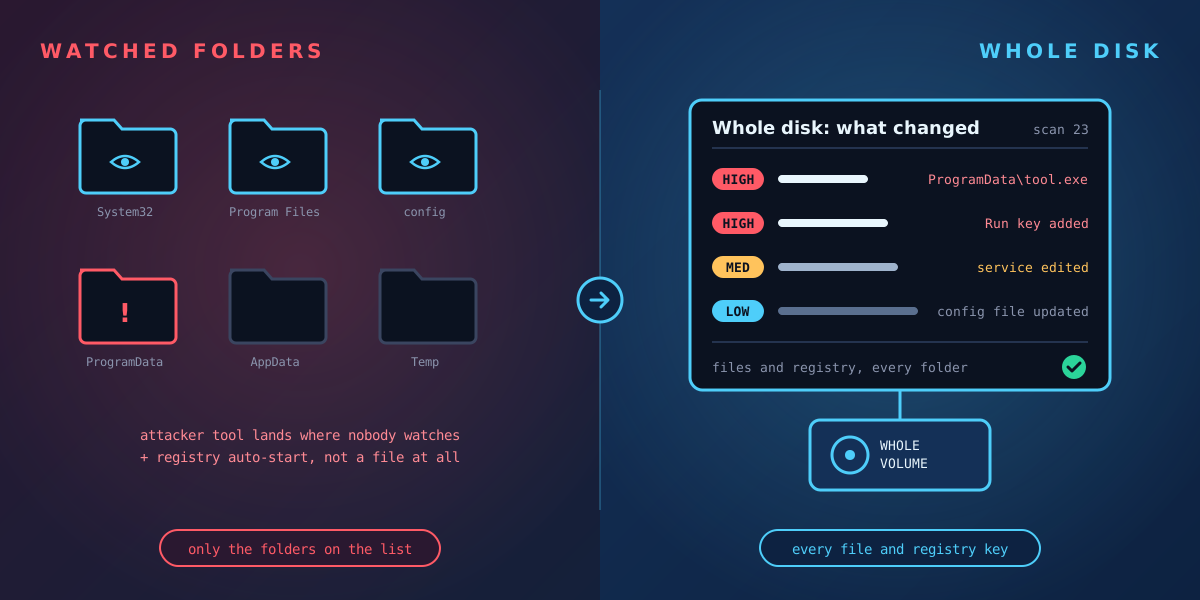
The weakness is in the name. A watch list only covers what is on it, and attackers know where FIM usually looks.
- Unwatched folders. Attacker tools commonly land in places such as ProgramData, user AppData folders and Temp, which are too noisy to watch closely and are often left off the list.
- The registry. Persistence often lives in the registry rather than in a file: a Run key, a service entry, an Image File Execution Options setting. File-only monitoring misses it entirely.
- Hidden places. NTFS alternate data streams can hide content alongside an ordinary file, and file-level checks don't always look at them.
- Faked timestamps. If a tool trusts the timestamps Windows reports, a file that has been backdated can look like it has always been there.
- Dependence on Windows itself. Monitoring that relies on auditing or event logs is blind if auditing is switched off or the logs are cleared, which are exactly the first things a careful attacker does.
- Noise. Watch too much and Windows updates bury the real changes; watch too little and you miss them. Most teams end up watching less than they would like.
What to look for in a FIM tool for Windows
When you compare tools, these are the questions that separate them:
- Coverage: does it see only the paths you list, or every file on the volume? Does it cover the registry, down to the changed value?
- Independence from logs: does it still see changes if auditing was switched off or event logs were cleared?
- Tamper detection: will it notice faked timestamps, cleared logs and switched-off auditing, and report them as findings?
- Context, not just alerts: does it tell you whether a changed program is digitally signed, where it was downloaded from, and whether it is set to start automatically?
- Risk rating: does it separate the risky changes from routine updates, with a reason you can act on?
- Noise control that can't hide the important things: can you suppress routine changes without a broad rule accidentally hiding an unsigned executable?
- History: can you go back to any earlier point and compare, months later, for an investigation or audit?
- Evidence: are results recorded in a way you could show an auditor, insurer or regulator, with machine, operator and time?
- Real-time vs scheduled: do you need an alert within seconds on a few critical files, a complete picture at regular intervals, or both?
Watched folders vs the whole disk
The two approaches answer different questions. Watch-list FIM answers "did any of these files change?" quickly. Reading the whole disk answers "what changed anywhere on this machine?", including places nobody thought to watch. For investigations, audits and finding what an attacker actually did, the second question is usually the one that matters.
Many organisations end up using both: a watch list for instant alerts on a handful of critical files, and a whole-disk record for everything else.
Where Tracknosis fits
Tracknosis takes the whole-disk approach. It is a lightweight agent for Windows that reads every file and registry record directly from the disk, compares each scan with the last, and rates every change High, Medium or Low with a plain-language reason. That means:
- No watch list to maintain: every folder and the registry are covered.
- It reads the disk itself, so it doesn't depend on auditing being switched on or logs surviving, and it flags them when they are cleared or switched off.
- Faked timestamps, unsigned or downloaded programs and new auto-starts are flagged.
- Rules hide routine changes, but High-risk changes are never hidden, and folder rules can't hide unsigned executables or scripts.
- Scan-by-scan history lets you compare any two points in time.
To be clear about the trade-off: Tracknosis compares scans, so it shows changes at the next scan rather than within seconds of them happening. If you need an instant alert on a specific file, keep that capability alongside it.
See what changed across the whole disk
Request a guided trial: we install Tracknosis with you on one of your Windows machines and walk you through your first results.
Request a guided trial Compare with SIEM, EDR and FIM