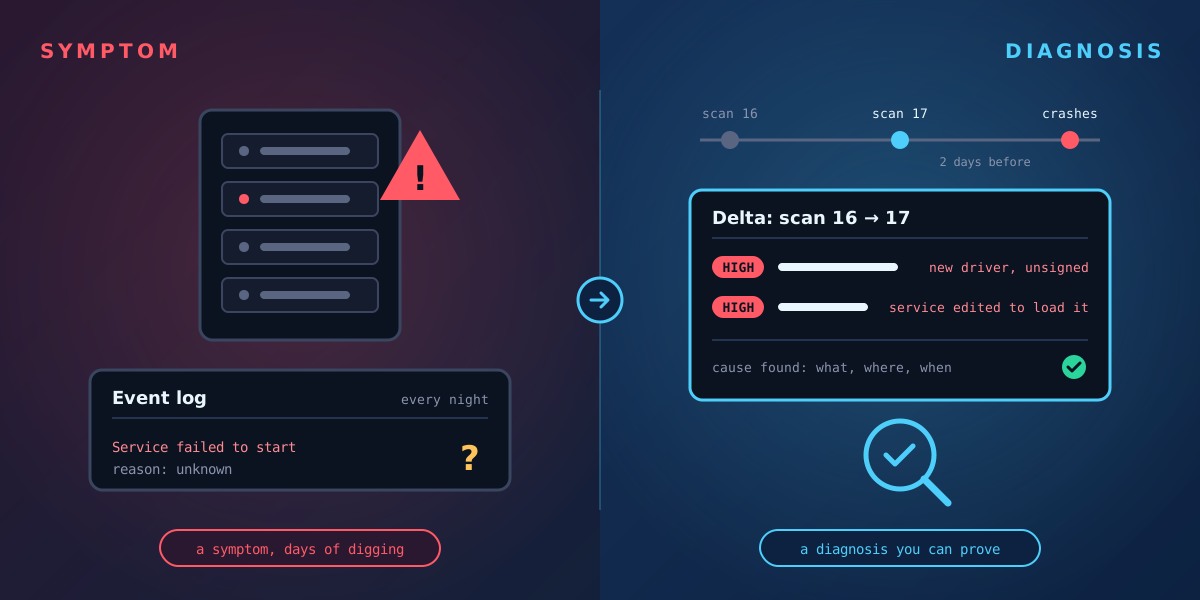
Most monitoring answers the question "is something wrong right now?" A server is slow, a service has stopped, an alert has fired. That is the symptom. The question that actually ends an incident is different: what changed to cause it?
What a delta is
A delta is the set of differences between two points in time. If you know exactly what a machine looked like last Tuesday, and exactly what it looks like now, the delta is every file and setting that was added, edited or removed in between. Nothing more, nothing less.
Tracknosis builds that picture by scanning each Windows volume directly. The first scan records a baseline. Every later scan is compared with the history, so you can pick any two points and see the changes between them.
An illustrative example
Imagine a file server that starts crashing every night. The event log shows a service failing, but not why. Working backwards from the symptom could take days.
Looking at the delta instead, you might see that two days before the crashes began, a new driver file appeared in the system folder, a service entry was edited to load it, and the file is unsigned. That is a diagnosis: a specific change, with a time and a location, that you can investigate, reverse and prove.
The same approach works for security incidents. Instead of asking "what does this alert mean?", you ask "what changed on this machine around that time?" and get a concrete list.
Why the baseline matters
A delta can only reach back as far as your earliest scan. If the first scan happens after an attacker arrives, their changes are already part of the baseline. Tracknosis still flags some problems on a first scan, such as files with faked timestamps and risky auto-start entries, but the full picture comes from having a baseline in place before you need it.
That is why we describe Tracknosis as proactive forensic monitoring: scanning regularly when nothing is wrong is what makes the investigation fast when something is.
Keeping the noise down
Windows changes constantly: updates, caches, logs. A useful delta has to separate routine change from risky change. Tracknosis rates every change and lets you hide routine patterns with rules, while never hiding High-risk changes, executable files or protected locations.
See what changed on your Windows machines
Tracknosis gives you proactive forensic monitoring and continuous forensic observability for Windows Infrastructure.
Contact Us More articles